
Learn Java Programming
Java Programming
Java is a widely used, high-level, object-oriented programming language and computing platform, first released by Sun Microsystems in 1995 and now owned by Oracle. It is known for its "Write Once, Run Anywhere" (WORA) principle, meaning compiled Java code can run on any device with a Java Virtual Machine (JVM).
Java is a high-level, class-based, object-oriented programming (OOP) language known for its "Write Once, Run Anywhere" (WORA) capability. Developed by James Gosling at Sun Microsystems in 1995 and now owned by Oracle, it powers billions of devices, including smartphones, servers, and enterprise systems.
Key Features of Java
Object-Oriented: Java organizes software design around objects and classes, which improves code reusability and modularity.
Platform Independence: Java code is compiled into an intermediate format called bytecode, which the JVM then interprets for the specific underlying platform (Windows, macOS, Linux, etc.), ensuring portability.
Robust and Secure: The language incorporates strong memory management (automatic garbage collection) and exception handling, which helps in creating reliable applications.
Multithreading: Java has built-in support for handling multiple tasks concurrently, which is essential for high-performance applications and efficient CPU utilization.
Rich API and Libraries: Java provides an extensive set of built-in libraries and APIs for various programming needs, including networking, security, and database connectivity (JDBC).
What is Java Used For?
Java's versatility makes it suitable for a wide range of applications across different industries:
Android Apps: Most Android mobile apps are built using Java or other JVM languages.
Enterprise Software: Java Platform, Enterprise Edition (Java EE) is the industry standard for building large-scale, distributed enterprise systems for finance, healthcare, and government.
Web Applications and Servers: It is used for server-side development, using frameworks like Spring and Hibernate to build robust web backends.
Big Data Technologies: Major big data frameworks like Hadoop and Apache Kafka use Java as a core component.
Scientific and Gaming Applications: Java is also used in scientific computing applications and popular games like Minecraft.
Getting Started with Java Programming
To begin programming in Java, you need to install the Java Development Kit (JDK), which includes the compiler and the Java Runtime Environment (JRE). Developers can write code using a simple text editor or a powerful Integrated Development Environment (IDE) like Eclipse, NetBeans, or IntelliJ IDEA.
Core Components
JVM (Java Virtual Machine): The engine that executes Java bytecode, enabling platform independence.
JRE (Java Runtime Environment): Includes the JVM and libraries needed to run Java applications.
JDK (Java Development Kit): A full software development environment used to develop Java applications, containing the JRE and tools like compilers (javac) and debuggers.
Key Features
Platform Independent: Java code is compiled into bytecode, which can run on any device with a JVM installed.
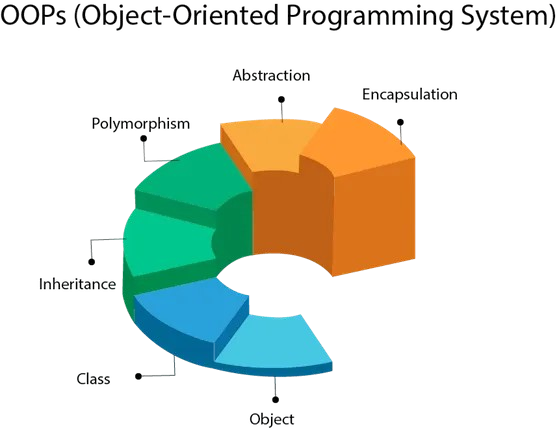
Object-Oriented: Organises code into classes and objects, supporting principles like inheritance, encapsulation, polymorphism, and abstraction.
Automatic Memory Management: Features Garbage Collection, which automatically frees up memory by removing unused objects.
Robust and Secure: Provides strong memory management, exception handling, and a "sandbox" environment to run untrusted code safely.
Common Use Cases
Mobile Applications: Primarily used for Android app development.
Enterprise Software: The backbone of banking, ERP, and large-scale business systems (e.g., used by Amazon, Netflix, and LinkedIn).
Cloud & Big Data: Used for decentralized applications and processing massive datasets with tools like Apache Kafka and Hadoop.
Scientific Computing: High-performance tools for processing complex data.
Getting Started
Download a JDK: Visit the Oracle Java Download page to get the latest version.
Pick an IDE: Professional developers often use IntelliJ IDEA, Eclipse, or VS Code.
Write "Hello World": Every Java program starts with a class and a main method:
java
public class Main { public static void main(String[] args) { System.out.println("Hello, World!"); } }
Let's see an example:
public class Main { public static void main(String[] args) { Calculator calc = new Calculator(); System.out.println(calc.add(5, 10)); } } class Calculator { public int add(int x, int y) { return x + y; } }
Run Java in your browser.
We have created an online editor to run Java directly on your browser. You don't have to go through a tedious installation process. You just can start coding directly.