


JavaScript Tutorial
JavaScript is one of the most popular programming languages in the world. It is the core language of the web and is used to create interactive and dynamic websites. JavaScript works alongside HTML (structure) and CSS (design) to build modern web applications.
1. Why Learn JavaScript?
Every web developer should learn:
• HTML – To structure web pages
• CSS – To style web pages
• JavaScript – To add functionality and interactivity
JavaScript runs directly in your browser and is completely free to use.
2. What is JavaScript?
JavaScript is the programming language that brings websites to life, turning static pages into interactive experiences. To get started, you don't even need to install anything—every modern web browser has a built-in Console where you can write and run code instantly.
Getting Started: Your First Script
Open your browser’s developer tools (Right-click > Inspect > Console tab) and type:
javascript
console.log("Hello, World!");
This command tells the browser to print a message to the console, confirming your environment is ready.
3. Core Fundamentals
Variables: Use let (changeable) or const (constant) to store data.
Data Types: The most common are Strings (text), Numbers, and Booleans (true/false).
Control Flow: Use if/else statements to make decisions and for or while loops to repeat tasks.
Functions: Reusable blocks of code that perform a specific task when called.
4. Interactivity & The DOM
The Document Object Model (DOM) is how JavaScript "talks" to your HTML. You can change text, colors, or hide elements dynamically:
javascript
// Changes the text of an element with id="title" document.getElementById("title").innerHTML = "Updated Title!";
5. Adding JavaScript to HTML
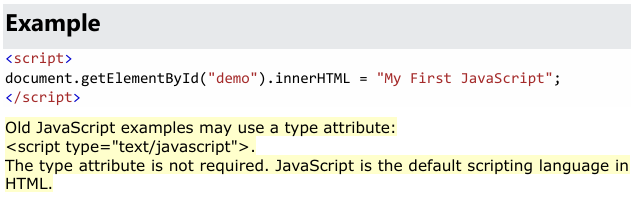
JavaScript code is written inside <script> tags. It can be placed in the <head> section or at the bottom of the <body> section of an HTML document.
Example:
document.getElementById("demo").innerHTML = "Hello JavaScript";
For better performance, scripts are usually placed at the bottom of the <body> section.
To link JavaScript to an HTML file within the <head> section, use the <script> tag with the src attribute.
Recommended Modern Approach
For optimal performance, always include the defer attribute when placing scripts in the <head>. This ensures the script is downloaded in the background and only executed after the HTML is fully parsed, preventing "render-blocking".
html
<head> <script src="script.js" defer></script> </head>
Key Methods for Head Placement
External File (Best Practice): Links a separate .js file to your HTML.
src="script.js": Specifies the path to your JavaScript file.
defer: Recommended for scripts that need to access the DOM.
async: Downloads and executes immediately when available; best for independent third-party scripts like analytics.
Internal/Inline Script: Used for writing small bits of JavaScript directly within the HTML.
html
<head> <script> console.log("Hello from the head!"); </script> </head>
Why Use defer in the Head?
Faster Loading: Prevents the browser from pausing page rendering to download the script.
Prevents Errors: Without defer, a script in the <head> may fail if it tries to interact with HTML elements that haven't loaded yet.
Order Guaranteed: Multiple scripts with defer will execute in the exact order they appear in the code.\
To link either a local file or a third-party library in the <head> of your HTML, use the <script> tag with the src attribute.
1. Linking a Local File
If your JavaScript file is in the same folder or a subfolder of your project, use a relative path.
Same Folder: If your HTML and script.js are in the same directory.
html
<script src="script.js" defer></script>
Use code with caution.
Subfolder: If your script is in a folder named js.
html
<script src="js/script.js" defer></script>
Use code with caution.
2. Linking a Third-Party Library
To use a library like jQuery or Bootstrap, you can link to a hosted version on a Content Delivery Network (CDN) using its full URL.
Example (jQuery from Google CDN):
html
<script src="https://ajax.googleapis.com/ajax/libs/jquery/3.7.1/jquery.min.js" defer></script>
Use code with caution.
Example (Bootstrap from jsDelivr):
html
<script src="https://cdn.jsdelivr.net" defer></script>
Use code with caution.
Best Practices for <head> Placement
Use defer: This attribute is highly recommended when placing scripts in the <head>. It allows the HTML to load first so the script doesn't block the page from appearing (render-blocking).
Mind the Order: If your local script depends on a library (like using jQuery commands), link the library first, then your local script.
html
<head> <script src="https://cdn.example.com/library.js" defer></script> <script src="js/my-custom-script.js" defer></script> </head>
6. Variables and Data Types
Variables are containers used to store data values. JavaScript provides three keywords to declare variables: var, let, and const.
Example:
let x = 5;
const pi = 3.14;
Data types include numbers and strings. Strings are written inside quotes, while numbers are written without quotes.
7. Operators and Expressions
JavaScript uses arithmetic operators like +, -, *, and / to perform calculations.
Example:
let total = (5 + 6) * 10;
8. Functions
Functions are reusable blocks of code designed to perform a specific task. They are executed when called.
Example:
function multiply(a, b) {
return a * b;
}
let result = multiply(4, 3);
9. JavaScript and the HTML DOM
The HTML DOM (Document Object Model) allows JavaScript to access and modify HTML elements, attributes, and styles.
Common DOM Methods:
• document.getElementById()
• document.getElementsByTagName()
• document.querySelectorAll()
Using the DOM, JavaScript can change content, modify styles, add or remove elements, and respond to user actions.
10. Events in JavaScript
Events are actions performed by users or the browser, such as clicks, key presses, or page loads.
Example of click event:
<button onclick="displayDate()">Click Me</button>
11. Output Methods in JavaScript
JavaScript can display output using:
• innerHTML
• document.write()
• alert()
• console.log()
The most commonly used method is innerHTML, which updates content inside HTML elements.
Conclusion
JavaScript is essential for modern web development. It enables developers to create interactive, dynamic, and user-friendly web applications. By mastering variables, functions, DOM manipulation, and events, you can build powerful web experiences.