Learn Basic SQL Commands
Basic SQL Commands
SQL (Structured Query Language) is the standard language used to interact with relational databases. Whether you're a developer, data analyst, or just curious, mastering these queries is fundamental to managing data.
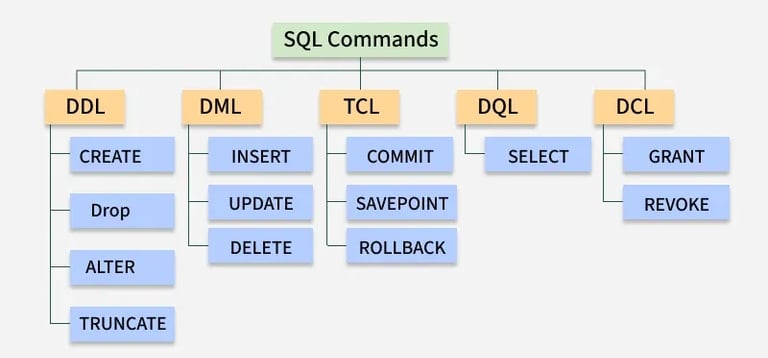
1. The Core "CRUD" Operations
Most database interactions fall into these four categories:
SELECT: Retrieves data.
sql
-- Get name and email for users in New York
SELECT name, email FROM users WHERE city = 'New York';
INSERT: Adds new records.
sql
INSERT INTO users (name, email, city) VALUES ('Jane Doe', 'jane.doe@example.com', 'Los Angeles');
UPDATE: Modifies existing data.
sql
UPDATE users SET email = 'new.email@example.com' WHERE name = 'John Doe';
DELETE: Removes records.
sql
DELETE FROM users WHERE city = 'Boston';
2. Common Filtering & Sorting Clauses
Refine your results using these essential clauses:
WHERE: Filters rows based on a specific condition (e.g., age > 20).
syntax-
SELECT column1, column2, ... FROM table_name WHERE condition;
ORDER BY: Sorts results in ASC (ascending, default) or DESC (descending) order.
syntax -
SELECT column1, column2, ... FROM table_name ORDER BY column1 [ASC | DESC], column2 [ASC | DESC], ...;
DISTINCT: Returns only unique values, stripping away duplicates.
syntax-
SELECT DISTINCT column1, column2 FROM table_name;
LIMIT / TOP: Restricts the number of rows returned, useful for pagination or testing.
syntax-
SELECT TOP count [PERCENT] ... FROM ... [WHERE ...] [ORDER BY ...];
syntax ( using Where and Order By Combination ) -
SELECT DISTINCT column1, column2, ... FROM table_name WHERE condition ORDER BY column_name [ASC | DESC];
3. Aggregations & Grouping
Used to perform calculations across multiple rows:
COUNT(): Counts the number of records.
SUM() / AVG(): Calculates the total or average of a numeric column.
GROUP BY: Groups rows that have the same values into summary rows.
HAVING: Filters groups after they have been aggregated (unlike WHERE, which filters before).
4. Joining Tables
Relational databases store data across multiple tables. Use JOINs to link them via related columns (like Primary and Foreign Keys):
INNER JOIN: Returns records with matching values in both tables.
LEFT JOIN: Returns all records from the left table and matched records from the right.
FULL JOIN: Returns all records when there is a match in either the left or right table.
Resources for Practice
Interactive Exercises: Try SQL Exercises at W3Schools or HackerRank SQL Challenges.
Online Editors: Test queries instantly using OneCompiler's SQL Server Editor or Oracle Online Editor.
Sample Databases: Practice on real-world schemas like Microsoft's AdventureWorks
Top rated by 100+ clients
★★★★★